Cannot download Software from Microsoft Edge browser
When the download finishes in the Microsoft Edge browser, but it has a yellow triangle and says it's blocked:
Click the 3 dots next to the download (top-right)
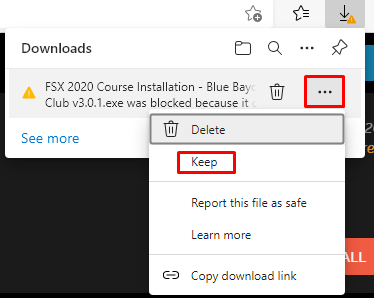
Select "Keep" > Show more > Keep anyway
Then click Open file > More info > Run anyway.
If you have any issues, please send an email to support@foresightsports.eu
Click the 3 dots next to the download (top-right)
Select "Keep" > Show more > Keep anyway
Then click Open file > More info > Run anyway.
If you have any issues, please send an email to support@foresightsports.eu
Related Articles
FSX Play Download Manager is not running / courses are not downloading
FSX PLAY Download Manager Won’t Download Courses If FSX PLAY's Download Manager isn't functioning (even in version 1.2.0.3 or above), use these steps to restore course downloads: The background Download Manager process might not be running, or it's ...How can I check my software version?
Here is where to find your current software version: FSX 2020/FSX Play/FSX Pro 1. Open FSX 2020 > Click on the Foresight Sports logo at the top of the main screen. 2. The pop-up window will show your current version. Foresight Fairgrounds 1. Open ...How to Optimize Your PC for the Best Foresight Sports Software Experience
1. Windows Update Please ensure that you do not have any pending Windows Updates left before you update your NVIDIA Graphics card driver. Go to the Start Button and select the Settings button. Select Update and Security. From this Windows Update ...How to Activate and Manage Your FSX Software License
Foresight Sports software licenses (FSX Play, FSX 2020, FSX Pro, and Foresight Fairgrounds) are tied to your FSX Live account, not to a device or launch monitor. This article explains how software licenses are purchased, activated, deactivated, and ...How do I move my license to a new PC?
Before you start, please make sure that all the Windows updates are installed on your computer. 1. Visit the official support site - https://support.foresightsports.com/support/software - Download the latest version of FSX 2020 or FSX Play (whichever ...